#Lync for Mac 14.0.7 Bug
Just a quick heads up, if you are running Lync for Mac 14.0.7 and you unplug a USB Audio Device (i.e. Plantronics headset, etc), Lync will crash. Found this at a client and had a few co-workers confirm. Hopefully Microsoft will get that fixed quickly but I’m guessing we will have to wait until 14.0.8 in three months.
UPDATE: It has been confirmed as a bug and should be fixed when 14.0.8 is released (sometime in Q1-2014).
#Lync, DHCP Option 43 and a lesson learned
I’ve deployed a lot of Lync Phone Edition devices. Thing is, I’ve done so mainly in smaller environments where we used either a Standard Edition Front-end server or an Enterprise “pool” that consisted of a single server. Why is this important you ask? Well, let’s go to one of the best articles on DHCP Option 43: http://blog.schertz.name/2012/05/understanding-dhcp-option-43/
In Jeff’s article, he has this paragraph in the middle of it:
If multiple Lync servers are deployed in the environment then the _SipServer _parameter may need to be defined as a Lync Pool FQDN (in the case of an Enterprise Edition deployment). Additionally if any load balancing is configured on the Front End pool and the Internal Web Services FQDN is different than the Pool FQDN (in the case of DNS Load Balancing) then an additional switch of _WebServer _needs to be used to provide the Web Services FQDN. If the WebServer swtich is not provided the command uses the _SipServer _value by default for both the registrar and web services location.Additionally if a Director Server or Pool is in place then the Director FQDN is typically defined as the _SipServer _parameter (and the _WebServer _parameter is not needed).
#Lync and Remote PowerShell
Lately, I have found myself in situations where I don’t have full domain admin rights while working on Lync. This isn’t a bad thing but one area that I consistently run into issues with is the Lync Management Shell. If you are on a Lync Front-end and you don’t have Administrator rights, the local Lync Management Shell doesn’t actually do Role Based Access Control (RBAC). Therefore, I’ll try to execute a command (say, set-csuser, grant-csdialplan, etc) and get a permission denied. Yet, I can go into the Lync Control Panel and change a setting on the user just fine.
#Lync 2013 and Display Photo from Website
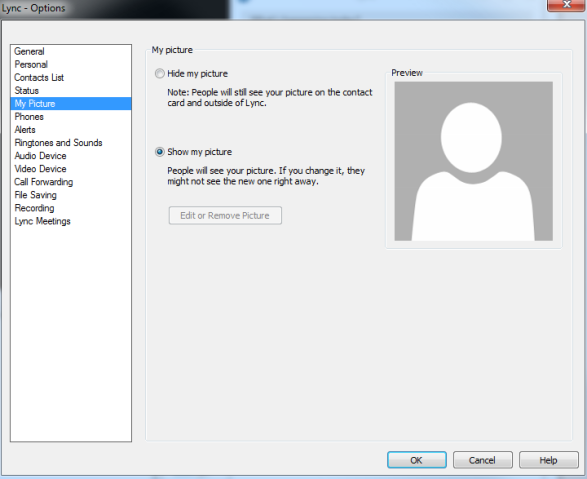
This was a feature that was removed in the Lync 2013 client that many people had used in Lync 2010. Well, with the November 2013 Update, it’s back! One thing though, you have to enable it via policy (source: http://masteringlync.com/2013/11/11/lync-client-cu3-november-update-show-a-picture-from-a-website/):
$PolicyEntry=New-CsClientPolicyEntry -Name EnablePresencePhotoOptions -Value true $currentClientPolicy=Get-CsClientPolicy -Identity Global $currentClientPolicy.PolicyEntry.Add($PolicyEntry) Set-CsClientPolicy -Instance $currentClientPolicy
Before you run this, here is what you will see:
After you run the code snippet:
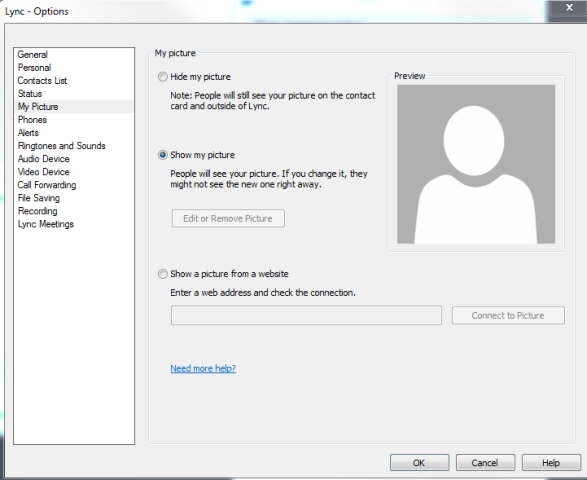
I know many people have been clamoring for this since the release of Lync 2013. Glad to see it back!
Hyper-V Replica Essentials
I had the opportunity to be a technical reviewer for Hyper-V Replica Essentials by Vangel Krtevski (published by Packt Publishing). If you haven’t worked with Hyper-V Replica yet, this book is a great place to start and covers what it is, how to set it up and how to use it. The book gives you everything you need in one place to be successful when using Hyper-V Replica.

You can get the book from Packt here: http://bit.ly/1aDezz9
#Lync, the GAL and Mavericks
Ran into an issue at a client where Mac clients couldn’t download the GAL. Upon investigation, it turns out that all of the affected machines were running Mavericks. Flipping the client policy to WebSearchOnly allowed the clients to search the GAL again. I have been able to reproduce the issue with the help of some co-workers and determined that if affects Lync 2013 and Lync 2010 users.
Hopefully this will be fixed in a future update.
August/September COUCUG Meeting Content
This has been posted for a bit but I forgot to blog it. If you are interested in SIP Tracing or Lync as a PBX, you’ll want to go grab these slide decks. Mike Stacy did an awesome job explaining SIP messages and I did the Lync as a PBX discussion.
You can download them directly here: https://skydrive.live.com/?mkt=en-US#cid=5C11935A4B9961BF&id=5C11935A4B9961BF%21107
Or you can go to www.coucug.org and access all of the past presentations there.
Change User Account for #Lync Monitoring Reports
My previous employer has posted a blog post that I wrote for them awhile back. It was written about how to change the user or the password for the Lync Monitoring Server reports.
You can check it out here: http://pei.com/2013/11/change-user-account-for-lync-archivemonitoring-reports/
DHCP Option 002 (Time-offset) for #Lync and #Polycom Phones
*** Update 11/27/2014 - It was asked in the comments if this applies to the Lync Phone Edition devices (LPE). LPE is created/maintained by Microsoft but various companies manufacture the devices, including Polycom. The Polycom LPE’s are the CX series phones. This article does not apply to the LPE devices. It only applies to the Polycom phones that run Polycom’s own software such as the VVX line of phones.
Lately, I have found myself having to do the math for the time offset for DHCP Option 002. I decided it was worth just documenting them so I could look them up quickly and what better way to come up with all of them than with Powershell?
Polycom VVX 5.0.1 update via #Lync Management Console
Happened to see that the 5.0.1 update for the Polycom VVX phones hit there website today and wanted to test the new way to deliver updates to the devices. You can go here for the update:
http://support.polycom.com/PolycomService/support/us/support/voice/business_media_phones/vvx500.html
Download the CAB files:

Unzip the files and you will find that they even included a PowerShell script to import the update. Run the import script and you should see a whole lot of devices show up in Device Updates: