Skype4B In-place Upgrade and LRS Admin Portal
While reading through the In-place Upgrade docs, I spied this little nugget:
Be sure to uninstall LRS Admin tool for Lync Server 2013 before running In-Place Upgrade. The LRS Admin Tool for Lync Server 2013 cannot coexist with Skype for Business Server 2015. After running In-Place Upgrade install the new LRS Admin tool, see Microsoft Lync Room System Administrative Web Portal for Skype for Business Server 2015
I haven’t tested this but the fact that they say to Uninstall the Lync Server 2013 LRS Admin Portal was the big catch. Make sure you read all of the docs a few times before you start the upgrade process.
Lync Edge Server Port Ranges and QoS
Ran into this and felt like until the documentation is updated, I should call this out. On this Technet article, it shows you how to configure port ranges for Edge Servers in Lync Server 2013. In the hopeful case that this page is updated, here is a static image:
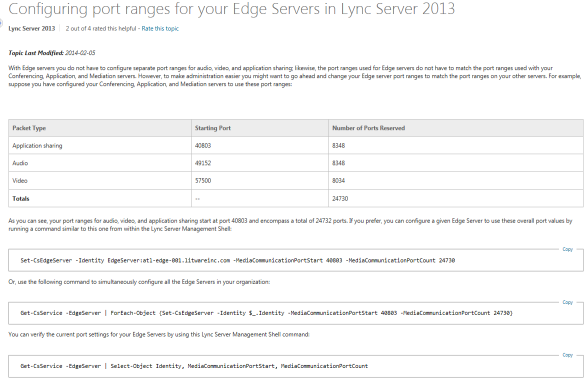
The issue with this article is that it appears to tie the port ranges for the Edge server to QoS which is not the case. You need to read the article very carefully. The first sentence in it tells you that you do not need to configure separate port ranges for Audio/Video/Application Sharing on the Edge. It then goes on to tell you how to change the port ranges to match up with what you may have set for your front-end servers.
Thinking vs Hope
The most dangerous words that come from my mouth are usually “I’ve been thinking.” When I think, my thoughts go everywhere. Most of the time they go to good places but when things get serious, when big decisions are on the line, my thoughts usually betray me. They go to the dark places of my mind. Fear creeps in and takes over.
I recently had a moment like this. It took a bit to recognize it but once I did, I knew that I had to refocus my thoughts. What I found was hope. We hope for things to come, things we don’t yet have. By focusing on hope, it becomes easier to see good outcomes. Hope for a better a situation, a better future. Hope.
Hotfix for Lync for Mac 2011 14.0.10
This is a hotfix that you can apply to your Mac if you are running 14.0.10. From the folks I have helped deploy this to, it makes a significant improvement.
http://support.microsoft.com/kb/3019983
The funny part about this is that the hotfix comes as a .exe file which is not native to Mac’s. In order to extract it, open a command window and use the Unzip command, i.e. “unzip hotfix.exe”.
One of the first things I noticed that was fixed in this is that screen shares are much faster and smoother. A co-worker reported to me that he sees less crashes with the Mac for Lync client.