Cloud Renegade
  • About
  • Posts
  • Tags
  • Archives
May 20, 2026

Yealink Teams Phones Auto Provisioning

We’ve had multiple customers recently ask for how to bypass setting the admin password during the OOBE. I finally sat down and spent time working on it.

First, I spent way too much time trying to set multiple things. The one thing we can do is bypass setting the password during OOBE. You CANNOT bypass OOBE. EDIT: Yes, you can. See below.

Here are the docs from Yealink: Yealink Support - (HD IP Phones Auto Provisioning Guide (this applies to all of the MPXX devices))

read more
December 14, 2021

Microsoft Teams Tip Tuesday - Use Status Message in Guest Tenants

This is one of those “why didn’t I think about that” types of things. As someone who works with many different companies (both as a partner or customer relationship), I get invited to lots of tenants to participate as a guest. One of the challenges of this, is that if someone from that organization tries to message me directly, many times it ends up going to the Guest account in their tenant instead of to my External account that I am in 99.999% of the time. This means I don’t see the message until I switch to that tenant or, if I’m lucky, I get the “Your colleague is trying to reach you in Teams” email. Here’s a great example of this:

read more
April 27, 2021

Enable Light Bar for Crestron Teams Panel

This is a very quick, easy post. Recently, I received a Crestron Teams Panel (model TSS-1070-T-B-S-LB Kit). This device is for the outside of a room so your co-workers can see what the schedule is for the room. One of the very cool parts of the device is the light bar that goes with it. It allows you to see at a glimpse as you are walking down the hall whether the room is available or not.

read more
February 4, 2021

Troubleshooting Microsoft Teams Room Calendar Issues

Microsoft Teams Rooms - Cannot Fetch Calendar

Recently found myself having to troubleshoot an issue with a couple of Microsoft Teams Rooms (MTR’s) at a customer that said “Cannot Fetch Calendar”. I started to go through the basics and thought I should document them for others and then reveal what we found.

The basics:

  1. Ensure that you created the Exchange account correctly - I always start with this page when creating new MTR accounts: [https://docs.microsoft.com/en-us/MicrosoftTeams/rooms/with-office-365] (https://docs.microsoft.com/en-us/MicrosoftTeams/rooms/with-office-365)
  2. Verify your Autodiscover record - I tend to do something like this: Resolve-DnsName autodiscover.domain.com (Note: this needs to point to either Exchange Online or if on-prem, Exchange 2013 or higher)
  3. If you only just created the account, wait a bit longer.
  4. Use the Remote Connectivity Analyzer (RCA) - https://testconnectivity.microsoft.com/tests/exchange

In our case, we got to step 4. After running the RCA, we got the following message:

read more
December 16, 2020

Speaking at Working Better with Microsoft Teams: Burnout

Speaking on Burnout at Commsverse

Super honored and excited to share my thoughts on the topic of Burnout at the Working Better with Microsoft Teams Virtual Event (put on by Commsverse and UC Today).

I first shared my story and thoughts on this topic just over a year ago at Microsoft Ignite 2019. Seems like more than 12-14 months ago now. Little did I know then that the topic that I was so passionate about would “double down” on us all with the year 2020.

read more
December 8, 2020

MDM Terms of Use Issue

Ok, this post is about an issue that took me longer to fix than it probably should have. I was trying to Azure AD Join (AADJ) a machine to our Azure AD and it kept failing. It was giving me the following error:

Something went wrong.

Specifically, it states “Looks like we can’t connect to the URL for your organization’s MDM terms of use.”

I spent a bit of time searching on what could be causing this issue. I even went and reset our MDM/MAM URL’s in Azure AD. Nothing was working.

read more
November 24, 2020

A step away from social

You might be wondering what this post is all about. Well, you may or may not have noticed, but I’ve been pretty quiet on social media lately. This year has been crazy. Earlier in the year, I saw a few folks I follow decide to take a break from social and left for months. I understood at the time how one could be burned out and need to step away.

read more
October 13, 2020

Teams Tip Tuesday - How to Remove Yourself from a Team

Microsoft Teams Tip Tuesday - How to Remove Yourself from a Team

This post stems from something I got to witness a few weeks back. I was on the receiving end of an email blast from someone asking to be removed from a Team that we were both in. The part that makes this interesting is that there are like 1000+ other members of the Team and everyone got blasted by the email. In addition, then we all got to get the Reply All responses back to the original email.

read more
July 22, 2020

Microsoft Teams Live Events Attendee Tracker

Microsoft Teams Live Events

Recently, I have been helping an organization with a public webinar/briefing that they are doing. They chose Microsoft Teams Live Events which is how I ended up getting connected with them.

For their event, they would have people from all over coming to the webinar. Naturally, this meant that we chose for the event to Public:
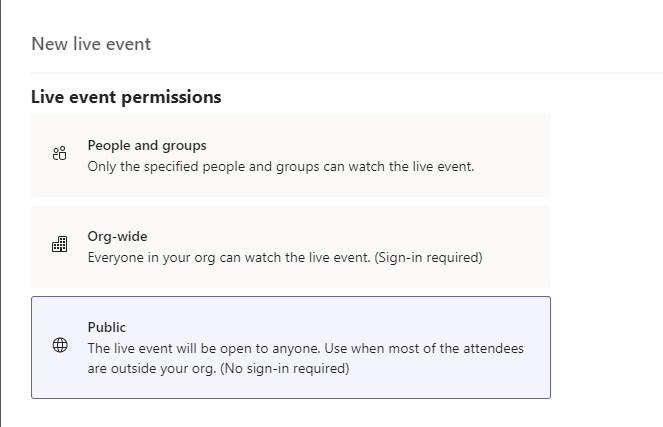
Microsoft Teams Live Events Public scheduling

When discussing how this would work with the customer, it came to light that they really needed to track who actually attended the webinar. With Public events, you don’t get to see/record who actually joins a meeting. They are anonymous and thus creates the problem.

read more
July 16, 2020

BSSID Wildcards for Emergency Services in Microsoft Teams

When deploying Microsoft Teams Phone System, a critical piece is ensuring users can dial Emergency Services. How to do that is not the point of this post (though, look for a post on that soon).

The point of this post is to call out a few things around using a BSSID to determine where a user is located.

What is a BSSID

First, what is a BSSID? The BSSID is the Basic Service Set Identifier. This describes the section of a wireless network. It is typically made up of the MAC address combined with the SSID. For more details on it specifically you can go here: https://www.speedcheck.org/wiki/bssid/.

read more
  • ««
  • «
  • 1
  • 2
  • 3
  • 4
  • 5
  • »
  • »»
© Cloud Renegade 2026