Cloud Renegade
  • About
  • Posts
  • Tags
  • Archives
January 21, 2014

Find #Lync Versions

Awhile back, a tool called Find Lync Versions was released. This tool was pretty helpful in finding out what versions of Lync were registering to a server. For me specifically, it helped me find a bunch of old CX700 phones that were connecting with OCS versions of Lync Phone Edition. I recently went to find it again and the site that it was hosted on was gone.  I used the Way Back Machine and an old copy I had to use it again recently. Thought I would re-post the directions for it as its main feature was a SQL Query against the RTCLocal database. Since I don’t know the original author nor do I have their permission, I am not going to re-publish the zip file publicly. Hopefully the original author can re-post it or the source code somewhere.

read more
January 16, 2014

#Lync Conferencing Anonymous User Time-out

Ran into this awhile back and documented it in my “To Blog” note pile. Client wanted to know how long someone who isn’t the meeting owner (i.e. a guest from another company) could stay in a meeting before they were kicked out if the meeting owner (aka Presenter) dropped.  I found this article on Technet: http://technet.microsoft.com/en-us/library/gg398340.aspx and it explained the following:

AnonymousUserGracePeriod:

Represents the amount of time an anonymous (unauthenticated) user can remain in a meeting without an authenticated user being present in that same meeting. For example, if this value is set to 15 minutes an anonymous user can stay in the meeting for, at most, 15 minutes before an authenticated user must join. If an authenticated user does not join before the grace period expires then the anonymous user will be removed from the meeting. This setting applies to both scheduled meetings and to ad-hoc meetings created by clicking Meet Now in Microsoft Lync.

read more
January 14, 2014

Lync Debugging Tools updated

My good friend Jonathan McKinney originally posted this article about the Lync Debugging tools:

http://blog.lyncdialog.com/2013/03/inboundrouting-and-outboundrouting-does.html

In the article he notes that you should copy the default.tmx file from C:\Common Files\Microsoft Lync Server 2013\Tracing to the folder where the Debugging tools are installed as the default.tmx file that shipped with the Debugging Tools was only ~5Mb in size.

Well, I was following this advice as I always do and when I noticed that on this fresh install of the Debug tools, the default.tmx file was ~22Mb big. I went back and checked, and sure enough, the Debugging tools were updated on 1/8/2014.  You can get them here:

read more
January 13, 2014

COUCUG January Meeting (1/30)

The January meeting of the Colorado Unified Communications User Group (COUCUG) will be held on January 30th from 4-6pm at the Microsoft offices in the DTC. Plantronics will be sponsoring the meeting and will be providing food and drinks.

Our topics this month are:

  * Lync Meeting Etiquette
  * Deploying Lync Voice

Please RSVP at www.coucug.org so we can bring in the right amount of food.

We’re looking forward to a great year with lots of great topics and hope you will join us.

read more
December 18, 2013

#Lync for Mac 14.0.7 Bug

Just a quick heads up, if you are running Lync for Mac 14.0.7 and you unplug a USB Audio Device (i.e. Plantronics headset, etc), Lync will crash. Found this at a client and had a few co-workers confirm.  Hopefully Microsoft will get that fixed quickly but I’m guessing we will have to wait until 14.0.8 in three months.

UPDATE: It has been confirmed as a bug and should be fixed when 14.0.8 is released (sometime in Q1-2014).

read more
December 13, 2013

#Lync, DHCP Option 43 and a lesson learned

I’ve deployed a lot of Lync Phone Edition devices. Thing is, I’ve done so mainly in smaller environments where we used either a Standard Edition Front-end server or an Enterprise “pool” that consisted of a single server. Why is this important you ask? Well, let’s go to one of the best articles on DHCP Option 43: http://blog.schertz.name/2012/05/understanding-dhcp-option-43/

In Jeff’s article, he has this paragraph in the middle of it:

If multiple Lync servers are deployed in the environment then the _SipServer _parameter may need to be defined as a Lync Pool FQDN (in the case of an Enterprise Edition deployment).  Additionally if any load balancing is configured on the Front End pool and the Internal Web Services FQDN is different than the Pool FQDN (in the case of DNS Load Balancing) then an additional switch of _WebServer _needs to be used to provide the Web Services FQDN.  If the WebServer swtich is not provided the command uses the _SipServer _value by default for both the registrar and web services location.

Additionally if a Director Server or Pool is in place then the Director FQDN is typically defined as the _SipServer _parameter (and the _WebServer _parameter is not needed).

read more
December 12, 2013

#Lync and Remote PowerShell

Lately, I have found myself in situations where I don’t have full domain admin rights while working on Lync. This isn’t a bad thing but one area that I consistently run into issues with is the Lync Management Shell. If you are on a Lync Front-end and you don’t have Administrator rights, the local Lync Management Shell doesn’t actually do Role Based Access Control (RBAC). Therefore, I’ll try to execute a command (say, set-csuser, grant-csdialplan, etc) and get a permission denied. Yet, I can go into the Lync Control Panel and change a setting on the user just fine.

read more
December 3, 2013

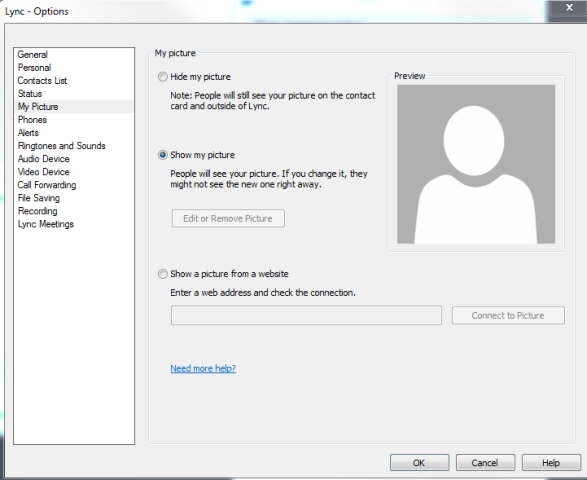
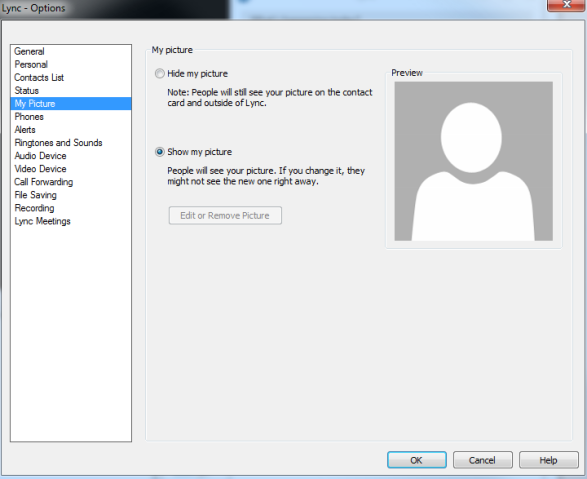
#Lync 2013 and Display Photo from Website

This was a feature that was removed in the Lync 2013 client that many people had used in Lync 2010. Well, with the November 2013 Update, it’s back!  One thing though, you have to enable it via policy (source: http://masteringlync.com/2013/11/11/lync-client-cu3-november-update-show-a-picture-from-a-website/):

$PolicyEntry=New-CsClientPolicyEntry -Name EnablePresencePhotoOptions -Value true $currentClientPolicy=Get-CsClientPolicy -Identity Global $currentClientPolicy.PolicyEntry.Add($PolicyEntry) Set-CsClientPolicy -Instance $currentClientPolicy

Before you run this, here is what you will see:
2013-12-03_1017

After you run the code snippet:

2013-12-03_1024

I know many people have been clamoring for this since the release of Lync 2013. Glad to see it back!

read more
December 3, 2013

Hyper-V Replica Essentials

I had the opportunity to be a technical reviewer for Hyper-V Replica Essentials by Vangel Krtevski (published by Packt Publishing). If you haven’t worked with Hyper-V Replica yet, this book is a great place to start and covers what it is, how to set it up and how to use it. The book gives you everything you need in one place to be successful when using Hyper-V Replica.

1881EN.jpg

You can get the book from Packt here: http://bit.ly/1aDezz9

read more
November 27, 2013

#Lync, the GAL and Mavericks

Ran into an issue at a client where Mac clients couldn’t download the GAL. Upon investigation, it turns out that all of the affected machines were running Mavericks. Flipping the client policy to WebSearchOnly allowed the clients to search the GAL again. I have been able to reproduce the issue with the help of some co-workers and determined that if affects Lync 2013 and Lync 2010 users.

Hopefully this will be fixed in a future update.

read more
  • ««
  • «
  • 5
  • 6
  • 7
  • 8
  • 9
  • »
  • »»
© Cloud Renegade 2026