Hotfix for Lync for Mac 2011 14.0.10
This is a hotfix that you can apply to your Mac if you are running 14.0.10. From the folks I have helped deploy this to, it makes a significant improvement.
http://support.microsoft.com/kb/3019983
The funny part about this is that the hotfix comes as a .exe file which is not native to Mac’s. In order to extract it, open a command window and use the Unzip command, i.e. “unzip hotfix.exe”.
One of the first things I noticed that was fixed in this is that screen shares are much faster and smoother. A co-worker reported to me that he sees less crashes with the Mac for Lync client.
Lync and Site specific Simple URL's
We recently had a requirement when deploying a new Lync 2013 pool to give a Site/Region their own Simple URL’s. I knew this could be done and it’s always easier when doing it during the deployment but this was the first time I had ever had to do it when the site had been running for awhile on Lync 2010 and using the Global Simple URL’s.
Our requirement was to go from using the Global Simple URL (meet.company.com) to a Regional based one of meet-emea.company.com.
Reflections on Best of #Lync Conf Denver #COUCUG
Yesterday, (April 24th), was the Best of Lync Conference Denver. As a leader of the Colorado Unified Communications User Group, I was involved in the planning, setup and execution of putting this event on. I wanted to take a moment to reflect on what we accomplished.
First, we had a goal of 40 attendees. We ended up with 48 or 49 plus the sponsors and leaders of the user group for a grand total of 58. We did this with about a months worth of planning and invitations. Based on the amount of effort that was put into just this, I have to say my admiration and and respect (which was already pretty big) for Jamie Start (@nomorephones) and his team has been exponentially magnified. I have no idea how they have pulled off the real LyncConf the past two years without going absolutely crazy. Seriously, that team must be amazing.
Jabra Motion UC [Initial Thoughts]
The good folks at Jabra sent me a stack of devices that I will be working my way through. This is my first impressions with the Jabra Motion UC device.
My day job requires me to be on the phone a lot. I work from home most days and use a headset or speaker phone for an average of 4-5 hours per day. A good headset and a speaker phone are a must. There are a few requirements that I have to have:
Find #Lync Versions
Awhile back, a tool called Find Lync Versions was released. This tool was pretty helpful in finding out what versions of Lync were registering to a server. For me specifically, it helped me find a bunch of old CX700 phones that were connecting with OCS versions of Lync Phone Edition. I recently went to find it again and the site that it was hosted on was gone. I used the Way Back Machine and an old copy I had to use it again recently. Thought I would re-post the directions for it as its main feature was a SQL Query against the RTCLocal database. Since I don’t know the original author nor do I have their permission, I am not going to re-publish the zip file publicly. Hopefully the original author can re-post it or the source code somewhere.
#Lync Conferencing Anonymous User Time-out
Ran into this awhile back and documented it in my “To Blog” note pile. Client wanted to know how long someone who isn’t the meeting owner (i.e. a guest from another company) could stay in a meeting before they were kicked out if the meeting owner (aka Presenter) dropped. I found this article on Technet: http://technet.microsoft.com/en-us/library/gg398340.aspx and it explained the following:
AnonymousUserGracePeriod:
Represents the amount of time an anonymous (unauthenticated) user can remain in a meeting without an authenticated user being present in that same meeting. For example, if this value is set to 15 minutes an anonymous user can stay in the meeting for, at most, 15 minutes before an authenticated user must join. If an authenticated user does not join before the grace period expires then the anonymous user will be removed from the meeting. This setting applies to both scheduled meetings and to ad-hoc meetings created by clicking Meet Now in Microsoft Lync.
Lync Debugging Tools updated
My good friend Jonathan McKinney originally posted this article about the Lync Debugging tools:
http://blog.lyncdialog.com/2013/03/inboundrouting-and-outboundrouting-does.html
In the article he notes that you should copy the default.tmx file from C:\Common Files\Microsoft Lync Server 2013\Tracing to the folder where the Debugging tools are installed as the default.tmx file that shipped with the Debugging Tools was only ~5Mb in size.
Well, I was following this advice as I always do and when I noticed that on this fresh install of the Debug tools, the default.tmx file was ~22Mb big. I went back and checked, and sure enough, the Debugging tools were updated on 1/8/2014. You can get them here:
COUCUG January Meeting (1/30)
The January meeting of the Colorado Unified Communications User Group (COUCUG) will be held on January 30th from 4-6pm at the Microsoft offices in the DTC. Plantronics will be sponsoring the meeting and will be providing food and drinks.
Our topics this month are:
  * Lync Meeting Etiquette
  * Deploying Lync Voice
Please RSVP at www.coucug.org so we can bring in the right amount of food.
We’re looking forward to a great year with lots of great topics and hope you will join us.
#Lync for Mac 14.0.7 Bug
Just a quick heads up, if you are running Lync for Mac 14.0.7 and you unplug a USB Audio Device (i.e. Plantronics headset, etc), Lync will crash. Found this at a client and had a few co-workers confirm. Hopefully Microsoft will get that fixed quickly but I’m guessing we will have to wait until 14.0.8 in three months.
UPDATE: It has been confirmed as a bug and should be fixed when 14.0.8 is released (sometime in Q1-2014).
#Lync 2013 and Display Photo from Website
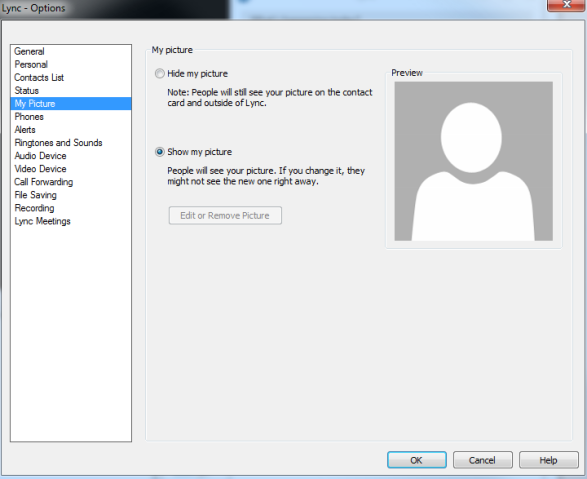
This was a feature that was removed in the Lync 2013 client that many people had used in Lync 2010. Well, with the November 2013 Update, it’s back! One thing though, you have to enable it via policy (source: http://masteringlync.com/2013/11/11/lync-client-cu3-november-update-show-a-picture-from-a-website/):
$PolicyEntry=New-CsClientPolicyEntry -Name EnablePresencePhotoOptions -Value true $currentClientPolicy=Get-CsClientPolicy -Identity Global $currentClientPolicy.PolicyEntry.Add($PolicyEntry) Set-CsClientPolicy -Instance $currentClientPolicy
Before you run this, here is what you will see:
After you run the code snippet:
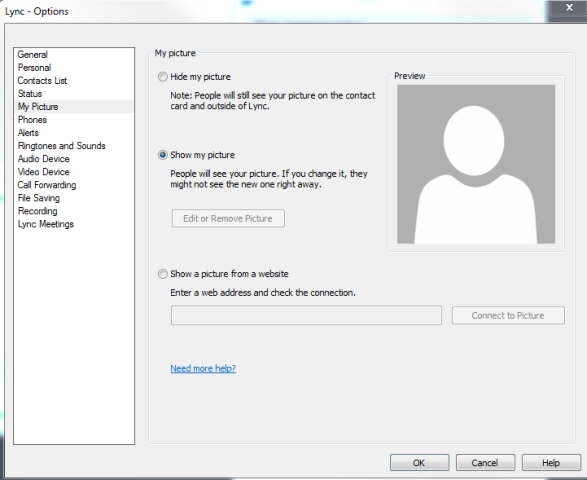
I know many people have been clamoring for this since the release of Lync 2013. Glad to see it back!