Yealink Teams Phones Auto Provisioning
We’ve had multiple customers recently ask for how to bypass setting the admin password during the OOBE. I finally sat down and spent time working on it.
First, I spent way too much time trying to set multiple things. The one thing we can do is bypass setting the password during OOBE. You CANNOT bypass OOBE. EDIT: Yes, you can. See below.
Here are the docs from Yealink: Yealink Support - (HD IP Phones Auto Provisioning Guide (this applies to all of the MPXX devices))
Microsoft Teams Tip Tuesday - Use Status Message in Guest Tenants
This is one of those “why didn’t I think about that” types of things. As someone who works with many different companies (both as a partner or customer relationship), I get invited to lots of tenants to participate as a guest. One of the challenges of this, is that if someone from that organization tries to message me directly, many times it ends up going to the Guest account in their tenant instead of to my External account that I am in 99.999% of the time. This means I don’t see the message until I switch to that tenant or, if I’m lucky, I get the “Your colleague is trying to reach you in Teams” email. Here’s a great example of this:
Enable Light Bar for Crestron Teams Panel
This is a very quick, easy post. Recently, I received a Crestron Teams Panel (model TSS-1070-T-B-S-LB Kit). This device is for the outside of a room so your co-workers can see what the schedule is for the room. One of the very cool parts of the device is the light bar that goes with it. It allows you to see at a glimpse as you are walking down the hall whether the room is available or not.
Troubleshooting Microsoft Teams Room Calendar Issues
Microsoft Teams Rooms - Cannot Fetch Calendar
Recently found myself having to troubleshoot an issue with a couple of Microsoft Teams Rooms (MTR’s) at a customer that said “Cannot Fetch Calendar”. I started to go through the basics and thought I should document them for others and then reveal what we found.
The basics:
- Ensure that you created the Exchange account correctly - I always start with this page when creating new MTR accounts: [https://docs.microsoft.com/en-us/MicrosoftTeams/rooms/with-office-365] (https://docs.microsoft.com/en-us/MicrosoftTeams/rooms/with-office-365)
- Verify your Autodiscover record - I tend to do something like this: Resolve-DnsName autodiscover.domain.com (Note: this needs to point to either Exchange Online or if on-prem, Exchange 2013 or higher)
- If you only just created the account, wait a bit longer.
- Use the Remote Connectivity Analyzer (RCA) - https://testconnectivity.microsoft.com/tests/exchange
In our case, we got to step 4. After running the RCA, we got the following message:
Teams Tip Tuesday - How to Remove Yourself from a Team
Microsoft Teams Tip Tuesday - How to Remove Yourself from a Team
This post stems from something I got to witness a few weeks back. I was on the receiving end of an email blast from someone asking to be removed from a Team that we were both in. The part that makes this interesting is that there are like 1000+ other members of the Team and everyone got blasted by the email. In addition, then we all got to get the Reply All responses back to the original email.
Microsoft Teams Live Events Attendee Tracker
Microsoft Teams Live Events
Recently, I have been helping an organization with a public webinar/briefing that they are doing. They chose Microsoft Teams Live Events which is how I ended up getting connected with them.
For their event, they would have people from all over coming to the webinar. Naturally, this meant that we chose for the event to Public:
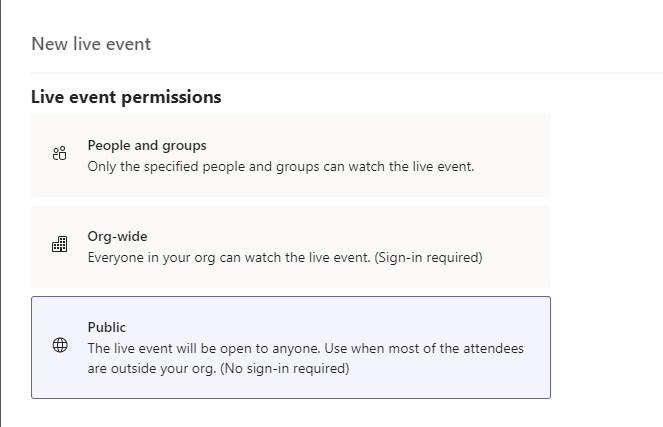
When discussing how this would work with the customer, it came to light that they really needed to track who actually attended the webinar. With Public events, you don’t get to see/record who actually joins a meeting. They are anonymous and thus creates the problem.
BSSID Wildcards for Emergency Services in Microsoft Teams
When deploying Microsoft Teams Phone System, a critical piece is ensuring users can dial Emergency Services. How to do that is not the point of this post (though, look for a post on that soon).
The point of this post is to call out a few things around using a BSSID to determine where a user is located.
What is a BSSID
First, what is a BSSID? The BSSID is the Basic Service Set Identifier. This describes the section of a wireless network. It is typically made up of the MAC address combined with the SSID. For more details on it specifically you can go here: https://www.speedcheck.org/wiki/bssid/.
Microsoft Teams, Poly Devices and Remote Packet Capture
This is one of those posts where I’m sharing more for me to come back and find later. I was working with a customer and got asked about QoS and ports. I had previously looked into this and then as one does, let life get in the way (evidently starting a business takes effort, who knew?) and I never got around to doing the network traces. So, today, I fired up my trusty old friend, Wireshark in order to watch was happening.
Speaking at Microsoft Ignite the Tour Toronto
Very pleased to be able to say that I’ll be speaking at Microsoft Ignite the Tour in Toronto on January 8th and 9th, 2020! If you are in the area, hopefully you are registered as the event is currently waitlisted. If you are registered and going, I hope you will try to find me and say hi!
My sessions are:
- ADM20 - Addressing top management issues with user and groups
- ADM31 - Role-based access control in Microsoft 365: Improve your operations and security posture
My sessions are both on January 8th but I’ll be at the event both days.
3PIP Phone and Online update required
UPDATE 1/14/2020: Deadline extended to July 15th, 2020 https://techcommunity.microsoft.com/t5/skype-for-business-blog/oauth-2-0-and-third-party-application-id-timeline-extended-to/ba-p/482876
This is one of those posts that probably feels like it might be late. Microsoft announced way back in April that 3PIP phones would need to be updated due to a change in the Application ID because of the implementation of OAUTH 2.0. Everyone should be happy that Microsoft is focused on implementing new and improved security features. That said, this one has the impact that companies NEED to update the firmware of their handsets and take a specific action. This will be enforced starting January 15th, 2020. Yes, you read that right, that’s less than a month away.