Outlook Meeting Setting
This is just a quick tip of the day. Having just changed company’s, I was re-setting up my Outlook profile, you know, adding my signature, etc. when I remembered this setting about meetings that I believe everyone should set:

We’ve all had it happen where we get booked in back to back to back to back meetings, right? No, just me? Anyway, by utilizing this setting, whenever I book a meeting that is 30 min, it only books for 25. Instead of an hour, it’s only 45 minutes. This allows for some margin in my day which is critical to maintaining balance. It provides me a quick break between meetings to stand up and stretch, make a coffee, whatever else might be needed.
Microsoft Teams and Call-me Back Changes
Was tipped off to this from a friend. For a long time, we’ve had the Call-me back feature as part of Teams. Microsoft has stated it would change several times over the past year or so, but it looks like it is finally going to happen:
Customers have been provided a complimentary dial-out capability that will end on November 30, 2019. Beginning December 1, 2019, each Audio Conferencing subscription provides 60 minutes per user per month that can be used to dial out to non-premium numbers in ANY of the Zone A countries as described in this document. Your tenant dial-out minute pool size is based on assigned licenses and not purchased licenses. This benefit is applicable to Audio Conferencing monthly subscription licenses and does not extend to Audio Conferencing pay-per-minute licenses.
Microsoft Teams Adoption and the Impact of Emotions
Lately, I’ve found myself studying the science of Adoption and Change Management (ACM). Mainly because Microsoft Teams is a pretty big foundational shift from how we’ve done things in the OCS/Lync/Skype world in some ways. In other ways, we’re faced with the same ACM struggles as OCS/Lync/Skype of simply getting the users to understand the software and how it can improve their lives.
I had two things happen to me today that compelled me to write this article. In both cases, the events brought up and out emotions from me (even if I do joke that my emotions like my taste buds are dead, yes, I like spicy food, but I digress).
Resource Accounts in Microsoft Teams and how they affect Auto Attendants and Call Queues (new, maybe?)
**UPDATE 7/24/2019: **The new license model has been released. Please reference https://docs.microsoft.com/en-us/microsoftteams/teams-add-on-licensing/virtual-user for guidance.
This might be one of those classic “Adam” moments. Maybe this has been this way and I’m only waking up to it now. That said, I have found in life, that if I have a question or a view, I’m usually not the only one who has it. So here goes.
Had someone bring this link up to me recently (HT to Randy, he’ll know who he is): https://docs.microsoft.com/en-us/microsoftteams/manage-resource-accounts
Microsoft Teams Tip Tuesday - Give more context!
This tip is somewhat based on last week’s tip. When posting a conversation into a Microsoft Teams channel, give as much context as possible. If you are posting a link, tell what the link is about, don’t just post the link. Also, tag people if you want them to see it specifically. Many times, we post things in a Channel and it ultimately just becomes a large “junk” drawer of content. There is a lot of valuable information in the channel but we can’t find it easily. By giving context and tagging people, it becomes easier to search for the information.
Microsoft Teams - Teams Meeting Outlook plug-in not showing
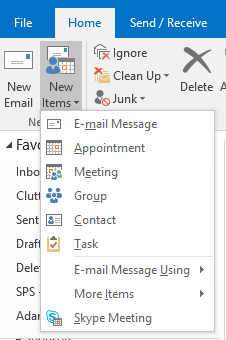
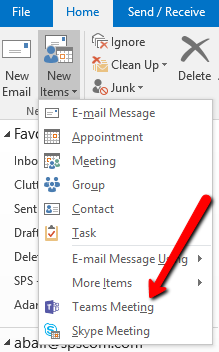
This is just a quick tip on how I fixed an issue with the Microsoft Teams “Teams Meeting” Outlook plug-in not showing up. If you have the Teams client installed, then in Outlook, you should get “Teams Meeting” under the New Items list.
Here is what I was seeing:
What I should have seen is:
After ensuring the Teams Meeting plugin was installed by looking in %LocalAppData%\Microsoft\TeamsMeetingAddin, I uninstalled and re-installed the desktop client (also closed and re-opened Outlook after this) but this had no affect.